Improve calendar view
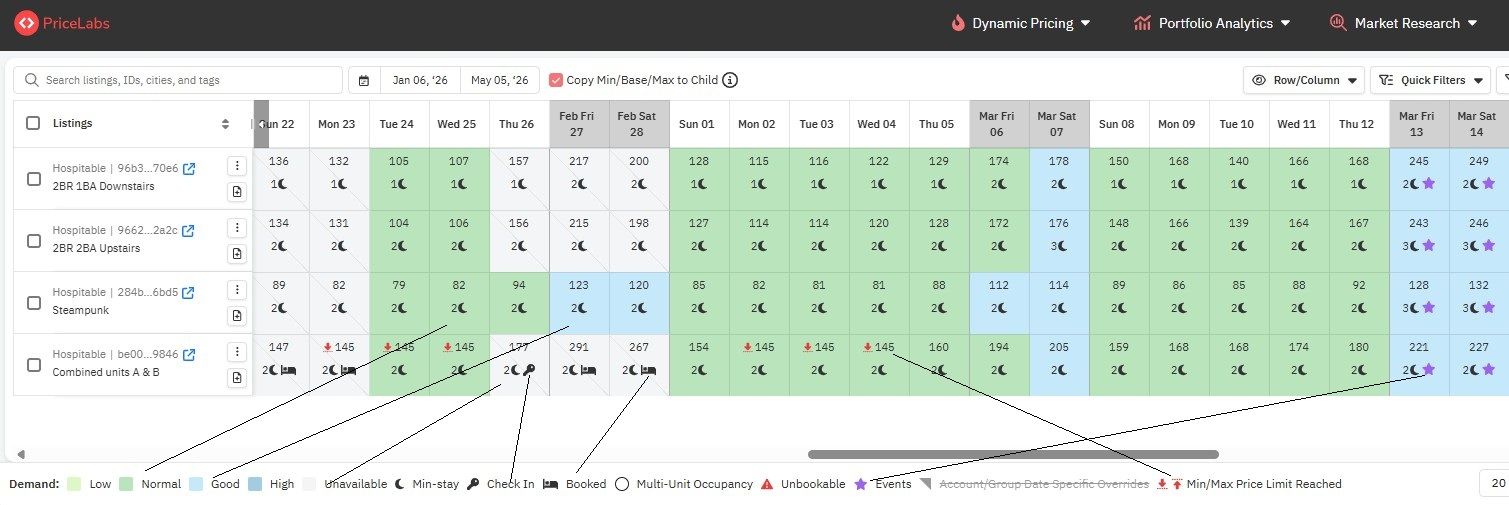
1) show pricing on the calendar even if the days are currently booked. Making sure pricing is correct (especially with dynamic pricing) is important. Guests cancel their stays from time to time and making sure the pricing is appropriate is key.
2) leverage color-coding on calendar to denote different demand types (i.e. Low, Normal, Good, High) so that at a glance, one can compare the prices across the calendar and know which days are low, regular, good, and high demand without having to hover over each day (see attached PriceLabs comparison).
3) Show symbols for when prices are hitting the minimum or maximum, special events, unavailable, etc.
Please authenticate to join the conversation.
Backlog
💡 Feature requests
Calendar
8 months ago
Subscribe to post
Get notified by email when there are changes.
Backlog
💡 Feature requests
Calendar
8 months ago
Subscribe to post
Get notified by email when there are changes.